
May 042011

I was recently given the opportunity to try L’Oreal Paris’ One Sweep Eye Shadow and Double Extend Eye Illuminator Mascara as a Bzz Agent.
 I have to say, I can’t say enough about the One Sweep Eye Shadow. The uniqueness of the applicator makes layering the different colors of eye shadows extremely simple. It truly is one sweep of the applicator on the shadow color pad and then one sweep to the lids. I found there to be no problem of the applicator not fitting on my lids. The applicator’s design was a comfortable fit in hand, and to the eye, when applying.
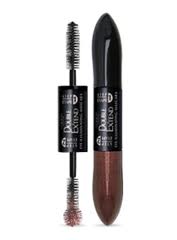
The Double Extend Eye Illuminator Mascara was very easy to use as well. The mascara applicator is double ended…another unique design. One end supplies the under coat mascara and the other end supplies the top coat mascara. The first step is to apply the darker end you see in the picture. I did not have very good luck with my lashes not clumping together with the first step. The second step is to apply the lighter color you see on the bottom. This seemed to go on easy; however, my lashes were still clumpy. Once my daughter saw my eyes all done she said, “Mom, you’ve got glitter all around your eyes.” Followed by, “I don’t like your eyes mom.” I was really bummed she didn’t like my eyes, but she was being honest and honesty is always the best policy. I haven’t given up on the Eye Illuminator Mascara, I see myself using the bottom coat more often, and saving the top coat for special occasions, especially at night.
That’s it! You can remove characters in the select box by placing your mouse pointer at the last character and hitting the back space bar, or alternatively, you can highlight the characters and hit the back space bar
At the top of the window pane you can even change the Font you’d like to have the character be. And, don’t forget to scroll down the side of the character box to see even more characters.
Hosted by: Ourfamilyworld, The Professionally Insane M Blog, One More Flew Over The Cuckoo’s Nest. A sincere thank you to all three of these bloggers for hosting this hop and for selecting Finger Click Saver for the Spotlight. Please be sure to leave me a comment so I can return the love if you are here for the first time. Have a great week! ~Sue
My mind had been working for a long time trying to figure out how I was going to get these clean. There was no way I was going to buy new ones just because I couldn’t put them in the washer. And, I am too cheap to send them to the dry cleaners. Sticking them in a tub of water wasn’t going to happen, as they would have dripped water everywhere when taking them out of the tub, for the mere fact you can’t ring out Roman Shades. I would have had to traipse through the house with them to get them outside to dry…wasn’t going to happen!
So I came up with this fabulous idea that worked like a charm! I took a wading pool (which I already had) and laying a shade in the pool, I sprayed it down with Greased Lightening (I LOVE this product). I then took the pressure washer and filled it with water and a tad bit of laundry detergent and sprayed the shade. I then set the next shade on top of the first, and sprayed that one just like the first one and then added the last one. I let the shades soak in this solution for about a 1/2 hour and then sprayed them all again with the pressure washer.
One by one, I then draped them over the back of my son’s wheelchair (you could use anything but make sure it’s clean…the chair was clean….I washed it while the shades soaked and I knew the materials on the chair wouldn’t run). Using the pressure washer I sprayed from the top down to get the detergents out of the shades. I did both sides and ended with a quick spray on the first side I had done. Lastly, I draped the shades over the deck railing on top of a towel to aid in soaking up the water for one, and for two, to dry them until they were just damp. I then hung them back up in his room to finish drying…no ironing was needed as I had put the slats back in the shades while they were damp. Let me tell you….the shades came out looking like they were brand new! I was ecstatic with the results. I will be washing my mini blinds the same way this spring.
For about an hours worth of my time…I saved myself a lot of money…and had the complete task done in about 2 1/2 hours.
Since January, Mr. Rebates has sent me an email telling me how much I have in my account, and give me the option of leaving it there, or cashing out on it. I have been pondering over cashing it out for the past two months. In one way, I would like the money in my PayPal account now, but if I wait until September/October to cash in, the money wouldn’t get spent and I could use it towards Christmas gifts. I know if I take the money out now, I will spend it as fast as I put it in there…shopping online.
Okay…writing this has actually helped me make a decision. I know Mr. Rebates isn’t going anywhere in the near future, so I think I will let the money sit there and continue to accrue more money from my online shopping (I have many bday’s coming up) and when fall comes around then cash out. I like the idea of having a $60 – $70 deposited just before Christmas…it will help with the anxiety I experience when I go to spend money for Christmas. Besides, it’s not like I’ve missed it up until now…it’s actually a bonus….and that amount wouldn’t make me any money in a savings account (to speak of) with todays interest rates.
Final decision…it sits there until fall….although, I just had this terrible thought…what if I were to die before getting to use that money? That would be such a waste! I think I’ll go to bed and sleep on it.
Have you ever had a kitten or a cat with an eye full of gunk? I have had a couple over the past few years. And, I have successfully cured the cat’s eye issue without a vet visit. How do I do this, you ask…well…I simply steep a cup of black tea.
You can do this too, in a matter of a few simple steps:
Within a short few days you should notice the eye opening fully again and no gunk coming out of it. If this isn’t the case, then it’s time to make a vet appointment.
Once you get to the page, ‘like’ the page, allow the app, watch the video, and then you’ll be able to submit your information for a free coupon.

Then I came upon The Couponizer and learned this:
The entire 6 piece system includes:
