Jul 112015

Jul 092015
Baby’s Brilliant Giveaway – $250 Cash to be Won
2 Winners – 2 prizes – $100 and $150

Today’s technology brings infants and children ways to learn that my kids never had the chance of experiencing. The Baby’s Brilliant App has so much to offer – take a look:
About Baby’s Brilliant App
The Baby’s Brilliant App offers a variety of short videos and music for today’s parent on the go. Created by a mother of three, the App introduces babies to the world around them in an enriching, playful and educational way. Available for Apple products in the iTunes Store and will soon be available for Androids.
FREE App Description
Educational and entertaining presentations for babies and toddlers.From Animated Children’s Songs to everyday-life movies set to classical music, Read Along Books to interactive Soundboards, the Baby’s Brilliant App introduces babies and toddlers to the world around them, in an enriching, playful and educational way.
Babies and toddlers can learn letters, numbers, animals, colors, shapes and a multitude of educational concepts, in multiple languages, while being entertained.
The App offers an extensive music library, from classical music to religious songs, as well as a large collection of Night Lights, specially designed and recorded to help your little ones relax and fall asleep.
Created by a mother of three who knows what it takes to quickly capture children’s attention and keep their interest.
An “All In One App” that offers videos, music, books, night lights and interactive soundboards, all under one roof.
Features:
· Hearing impaired are now included in the app
· Animations are more colorful and appealing to the baby’s eyes
· There are interactive videos to ask baby to click on animals to listen to their sounds
· Foreign languages are easier for baby to understand
· Night lights are better and more soothing for baby
Onto the Giveaway
Baby’s Brilliant Giveaway – $250 Cash to be Won
2 Winners – 2 prizes – $100 and $150
The giveaway will run from July 8, 2015 to August 18, 2015
Entry is simple using the Rafflecopter entry form below.
**Finger Click Saver is not responsible for prize shipment. This giveaway is not associated with any social media including, Facebook, Twitter, Pinterest etc.
Jul 092015
Any Gains For Deregulated Energy — Perhaps Yes
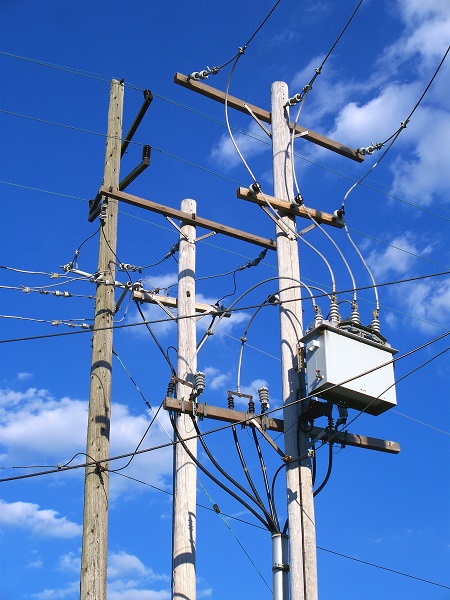
If you live in a deregulated energy area – a state or a municipality – it may seem that life suddenly became more complicated. And, it’s true; it did. Because now you live in an area with competing energy supply companies, which though confusing, is expected to bring your energy prices down through increased competition.
A little confusion is the price we pay for increased competition of a market that was once dominated by the local utility companies. These companies once owned the transmission lines and the electricity that traveled through those lines. Now, some deregulated states prohibit this. If you are a utility company, then you own the transmission lines, the power stations and the rest of the infrastructure that brings the electricity to your home. If you are a supply company, then you buy and sell the juice – the electricity surging through the lines.
Because of this new competition, companies that buy and sell electricity can offer customers choices that customers never expected in the past. They can choose, now, between where the supply company buys their electricity. If the consumer says, “Buy my electricity from renewable sources only,” then the consumer is actually voting with their wallets on what he energy market will look like.
A consumer can also check “I don’t care,” where their energy comes from.
Certainly, your appliances will not know the difference between electricity that comes from a nuclear power plant, a coal burning power plant or a natural gas burning plant. They will also not know if your power comes from a solar panel or a wind turbine or not. But you will know and that will send a significant signal to the energy industry – maybe the most significant signal of them all.
But suddenly, consumers are also faced with the task of getting out their calculators and a pad of paper and jotting down some notes on your power supplier. This is because as many suppliers as there might be in an area – that’s how many payment options there also might be.
Luckily, there are standard options across most companies. Let’s look at those for a second.
Fixed Rates
Just as it sounds, a fixed rate is a set rate through the length of your contract with your electricity supplier. You will pay a set or “fixed” rate per kilowatt hour for the length of the contract.
This can be like hedging your bets on an investment. If you think you have a low rate with a high rate possible in the future, sign a contract that will fix the rate now, so you will be one of the lucky ones if the rate goes up.
On the other hand, if prices drop, you are stuck with the higher rate. So, it is kind of a gamble, but one that many commercial customers appreciate, because they like to know what to expect in terms of business expenses.
Variable or Floating Rates
Just as it sounds, variable rates change month to month depending on the price in the open market. But you might think that the price of electricity will fall, at which point a variable rate plan will work in your favor, because the rate you pay falls when the rate falls.
Energy providers, such as EPCOR Alberta, are well-versed at explaining the differences to customers. In addition, providers can help you understand the various sources for electricity, as well.
As you likely know, electricity comes from generators that spin due to some power source. Steam from a large coal-burning plant turns turbines, which, in turn, turn the generators. All of this comes from heating up water, the same as you might do on a kettle on your stove at home.
Burning fossil fuels – coal, petroleum, natural gas, methane oil or diesel fuel – heats up water that turns the turbines. They have the advantage in today’s market of being relatively cheap, but they also contribute substantially to global warming with the CO2 emissions they put into the atmosphere.
Nuclear power is a very polarizing power source. Nuclear fuel, even after the power plant has made use of it (often called spent fuel) remains dangerously radioactive for hundreds of thousands of years. What to do with the waste and the possibility of a reactor melt-down are serious concerns. The plants are also hugely expensive to build, although once they are built they provide very inexpensive electricity.
Solar, wind and hydro power are considered renewable sources of power in that nature continues to provide sunlight, wind and running water in rivers that can create power. (Wind and hydro power can convert motion to turbine turning, while sunlight creates electricity by converting it through what are called photovoltaic cells.)
The beauty of a deregulated energy market is that consumers can also choose from various power sources, which gives them a hand in shaping the country’s energy mix in the future.
Do you have energy choices in your area? What are your thoughts?
Jul 022015
**This post contains affiliate links and an FCS team member may be compensated if you make a purchase after clicking through the links.

If you read last week’s post, you now know why Cricut’s Explore One™ and Explore Air™ machines are so incredible – and a must-have for any crafter.
About Cricut’s Design Space™
But what bridges the gap between the creative ideas in your head and the Cricut machine is the Cricut Design Space™.
Cricut’s Design Space™ is software for PC, Mac®, iPhone® and iPad® that you get for free with your Cricut machine of choice.
Instead of trying to figure out how to make your project, Design Space gives you the ability to focus on what you want to make. Your Cricut machine takes it from there and brings it to life.
With Design Space, you can start designing from scratch on your computer, iPhone® or iPad®, or you can use a pre-designed, Make It Now™ project. These ready-to-make projects are created by professional artists and include everything from home décor to fashion to paper crafting, and even a variety of FREE projects.
If you want to use one of Cricut’s 50K+ images, you can try them out in the Design Space to see which will look best in your project before you commit to purchasing it.
Uploading Images
When you’re ready to start designing, you can either use one of Cricut’s 50K+ images or easily upload your own using the “Upload Images” tool in Design Space. You can upload and cut .svg, .jpg, .png, .bmp, .gif, and .dxf files absolutely FREE. You can even use fonts already installed on your computer.
Cut What You Want® tool
The Design Space’s Cut What You Want® tool makes it easy to convert your design into a cuttable image in just a few clicks!
The Cricut Design Space™ app for iPad® and iPhone®
Cricut’s easy-to-use app for the iPad® and iPhone® makes it possible for you can design anytime and anywhere inspiration strikes you.
It also allows you to access all the project’s that you’ve personally designed, whether on your iOs device or your PC or Mac, and gives you access to all the Make-it-Now projects.
With this app, you can start a project while at the beach, enhance it at the ice-cream shop, add some embellishments while cozying up on your couch, and then cut it on the Cricut Explore in your craft room. Plus, it’s cloud-based, so your projects are always synced across all your devices.
P.S. Cricut is working on an Android™ app right now, so don’t feel left out if you don’t have an iPad or iPhone.
In a nutshell, Cricut Design Space™ gives you the creative freedom to design just about anything! Make party invitations, decorations, and favors. Create seasonal home décor or personalize wedding gifts. Add embellishments to your favorite photo memories.
And that’s just the tip of the iceberg! That’s why next week’s post (the last on in this series) will focus on some really fun and interesting projects that people have created using their Cricut machine and the Cricut Design Space.
The crafting possibilities with the Cricut Design Space are endless. The gears are turning on what my next project will be.
Jun 292015
**This is a sponsored post with Mums the Word Network and Amwell. Reviewer received a free visit to facilitate an honest review. All opinions are those of an FCS team member.

Times have certainly changed in the healthcare industry as to the options available when needing to be seen by a doctor. To that list of options one can include Amwell Telehealth Urgent Care Service.
I can remember when doctors did house calls in addition to office visits. That stopped – probably because of the increase in the population and/or insurance purposes. We then needed to be seen solely in a doctor’s office. For an emergency – to the local Emergency Room at a hospital we went. Next came Urgent Care Centers being placed into communities – giving individuals another choice of when and where to be seen. And now one can add to the list of choices – Telehealth Urgent Care services.
Amwell Telehealth is just that – an online Urgent Care service. Amwell is found on the web, or through an app (android & IOS). The beauty of this service is that one doesn’t need to leave their home to be seen by a doctor for a diagnosis of simple ailments. Most often the doctor can prescribe prescription meds (unless your state doesn’t allow this), when appropriate.
Who Would use Amwell’s Service?
Anyone who finds the need for a doctor that doesn’t fit in the realm of needing emergency services. You don’t want to be wasting time with a tele-visit if you’re thinking you’re having a heart attack or if you’re having suicidal thoughts –
A few reasons people go online to see a doctor:
- I feel like I should probably see a doctor, but can’t really fit it into my over-booked schedule.
- I’m flying tomorrow and can’t get out of work.
- It’s difficult for me to get a doctor’s appointment.
- I’m not sure if I should go to the ER or not.
- My doctor’s office is closed and I don’t want to go to an urgent care clinic or hospital
- I just moved and don’t know any doctors in my area.
- I just need a second opinion.
- I’m between jobs and have no coverage.
- I have a question about a loved-one’s health and would like some advice.
Some of the most common conditions that can be diagnosed and treated online:
- Bronchitis
- Cough
- Sinus infection
- Sore throat
- Urinary tract infection
- Vomiting
- Diarrhea
- Fever
- Pinkeye
- Flu
- Sprains and strains
- Cold
- Respiratory Infection
- Headache
- Depression
- Anxiety
- Weight concerns
- Smoking Cessation
Who are the Doctors You’d be Speaking to?
- The doctors you would see would be licensed physicians in your state.
Does Insurance Pay for These Visits?
- Many insurance companies will pay for the online visit. However, should you not have insurance, a 10-minute visit is $49.00. For readers of Finger Click Saver’s, save $10.00 off your first visit with the promo code: LOVEAMWELL10.
Our Thoughts
***Let me say this first!***
***If you can capture an image of what is going on – do so before beginning your visit. There is a place for you to upload images once you’re logged in. I hadn’t realized that, and wished I did, as the provider could have actually seen what my shingles looked like at the time of the visit.***
Onto our Amwell visit. We found Amwell is so easy to use. You can utilize them on the web, or through an app (android & IOS). Sign up was simple! Within five minutes, I had myself signed up online, (children under 18 can be added to your account).
Because I don’t have a camera on my PC, I downloaded the app to my iPad. Fast and simple to do. I then logged into Amwell. I was asked to choose the reason for my visit (Medical, Nutrition, Psychology).

I then needed to answer the following prior to being seen:
- What the reason was I wanted to see a doctor for?
- I was asked what my medical conditions are
- What medications I was on
- What my billing status was IE: insurance, no insurance
The available provider was already seeing a patient, so I was asked if I wanted to wait in the “Waiting Room.” I thought it was super kosher that I was provided with a profile of the doctor I would be speaking with. Had I not liked her credentials, I could have waited until other providers became available.
That said, in reading the provider’s profile I was very much at ease in speaking with her; so I opted to wait for her to come aboard. My wait was less than five minutes before she connected with me.
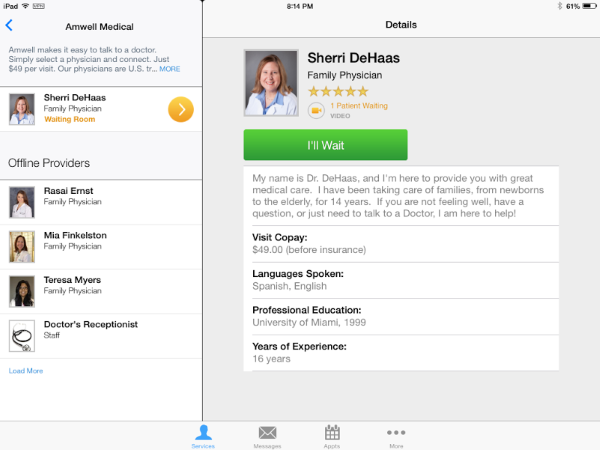
Once connected with me, the provider introduced herself. We had a glitch where she couldn’t see or hear me and since they ask for a phone number in case of any issues, she called me immediately on my phone. She had me refresh the app and we were then good to go.
One of the very first things that I was asked was what state I was from. This is to ensure that the provider is licensed to practice in the state you reside. After that, we went over my medications and conditions list. Next came my question I wanted answer to.
The issue for me at hand, was that I was wondering what I could take to help with the pain of shingles. You see, I had been diagnosed with shingles on my upper left butt cheek the day before my Amwell visit. The pain I was experiencing had already started three days before, but gradually progressed as time went on.
By the time I had my visit the pain was not only from my backside through to my pubic bone, but headed down my leg and into my toes. It was becoming increasingly hard to sit. My thighs were feeling heavy and crampy. I wanted to know if I could take Motrin around the clock to aid in that pain, or if there were something else that would help my pain.
The provider was amazing at explaining how shingles pain works. She reassured me that the medications I had been given was an aggressive treatment plan for me. I was informed of a couple other meds that I could be put on for neuropathy pain; however any narcotic – including morphine and any anti-inflammatory, would not work for shingles pain. Her advice to me was to see if I could wait it out rather than go on another medication specifically used for neuropathy pain.
The provider I spoke with was extremely professional. She spoke in terms that I could understand. She answered any questions I had. Would I use the Amwell Telehealth service again? ABSOLUTELY! I was left feeling that I had received the care and advice I was in need of.
Have you ever used Amwell Telehealth, or a similar service? What was your experience – please share.
Jun 292015
**Reviewer has been compensated with receiving the product in order to bring you an honest review. All opinions are those of the reviewer’s.
IntelliGLASS Hardened Glass Screen Protector
Review & Giveaway

We spend way too much money on our electronic hand-held devices to risk them being damaged. Whether it be a drop to the ground or something that comes crashing down on the device – if the screen receives damage – it could be a costly repair. That’s where protecting your device with an intelliGLASS Hardened Glass Screen Protector would be to your benefit.
Sure we can use the little plastic films that are available to protect screens, but one risks a broken screen if the device gets hit just so. What the IntelliGLASS offers is an extra layer of hardened glass that fits right over your device’s screen. Simply put – the IntelliGLASS will get the brunt of the impact opposed to the device’s screen, hopefully enough so that there will be no screen damage.
What is intelliGLASS?
Each of our screen protectors is crafted from intelliGLASS™, our most advanced protection yet. intelliGLASS™ is crafted from hardened glass that offers better than steel scratch protection, an oil and smudge resistant outer coating, and advanced silicone adhesion that eliminates bubbles and permanent residue.
The result is unmatched protection without losing clarity or touchscreen sensitivity. But that’s not it: we’re so confident that intelliGLASS™ will deliver as promised, we guarantee that it will last the life of your device.
intelliARMOR sells intelliGLASS for these devices – all with free shipping

We ordered the intelliGLASS HD Apple iPad AIR Screen Protector to facilitate this review.

All you need comes neatly packaged in a protective package.

The little brown packet you see on the left side contains an alcohol prep pad and microfiber cleaning cloth, which you use to clean the device’s screen. There is a squeegee that is used with the cleaning cloth after the intelliGLASS has been placed on the screen. One wraps the squeegee with the cloth to get any left over air bubbles out, squeegeeing from the middle outward. The buttons are to raise the home button to make it easier to use that button where the intelliGLASS will end up raising above the original button. You can choose between a clear button or a black button depending on your device and/or preference.
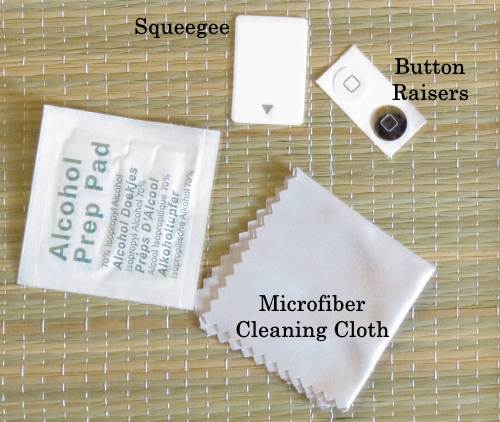
The packet on the right (above) contains the intelliGLASS and a sticky film to remove any dust and debris from the device after you’ve cleaned the screen with the alcohol prep and cleaning cloth.
Applying the intelliGLASS to the device is fairly easy; though I do suggest you have an extra set of hands available to help with the film removal and placement.
When all is said and done, your device will be protected by the intelliGLASS, and will appear as though there is nothing over the screen.
Here are shots that were captured after the install (by a camera):


I didn’t use a button to raise the home button – I didn’t feel the need to.
Our Thoughts on the intelliGLASS
I loved that the product came with literally everything needed for installation. The sticky film provided was a God send; simply because we have a lot of pets. If possible, an extra set of hands is helpful during placement of the intelliGLASS to the device. Two of us placed it on the iPad in no time.
The intelliGLASS was installed an iPad AIR 6. This device is used for Assisted Typing. That said, we’ve had no issues with the intelliGLASS hindering swiping the screen or typing. Often times, the pressure of my son’s pointer finger, when typing, is on the weaker side. We’ve had no issues typing with him because of this. This proved to me that the intelliGLASS did not affect the use of the screen.
As you can imagine, since this device is used for Assisted Typing, many hands are on that iPad screen. The screen pictures you see above depict no smudges or fingerprints and I didn’t clean the screen before taking the pictures. That’s very important for my son, as his vision is less than perfect. I am more than thrilled with the intelliGLASS living up to it being oil and smudge resistant.
I have to tell you, that between the cost of the iPad AIR 6 ($700) and the price of the case that is needed to attach the device to his wheelchair ($190 which doesn’t include a screen protector) – I was thrilled when I was approached by intelliARMOR asking me to perform an intelliGLASS Hardened Glass Screen Protector review – when I was. The timing couldn’t have been more perfect.
I feel much better knowing that his communication device has an extra layer of protection that is living up to what the company says it will (no clarity loss, oil and smudge resistant).
Lastly, there’s a piece of mind knowing that the company states: “we guarantee that it will last the life of your device.”
intelliGLASS can be purchased {here}. Get social with intelliARMOR on Facebook, Twitter, G+ and YouTube.
Do you use such a product? What has your experience been like?
Giveaway

One winner will win a choice of intelliARMOR’s intelliGLASS for their electronic device. Open to US only. Giveaway runs from 6/29/15 at 9pm EST thru 7/11/15 @12am EST. Please see Rafflecopter T&C for complete terms & conditions.
Please check the intelliARMOR website to make sure your device is listed.
**Participating bloggers are not responsible for prize shipment. Should you have any issues, please direct them to spar9797@fingerclicksaver.com. This giveaway is in no way associated with any social media including Facebook, Twitter, Instagram etc.
Jun 252015
**This post contains affiliate links and an FCS team member may be compensated if you make a purchase after clicking through a link.
Learn the Difference Between
Cricut Explore One vs. Cricut Explore Air
Are you thinking that a Cricut electronic cutting machine would be a nice addition to your crafting supplies? In this post you’ll learn about the two Cricut machines that are offered currently by Cricut – Cricut Explore One vs. Cricut Explore Air.
There are two machines that Cricut currently offers on their site:
Cricut Explore One™
Cricut Explore One™ is a simple design-and-cut system. It’s versatile, easy to use, cuts very precisely, and is also incredibly affordable. With its irresistibly low price and limitless cutting potential, the Explore One is perfect for a new or beginning crafter. Here are a few notable features of the Explore One:
Materials – All Cricut machines can cut an unbelievable variety of materials, for example:
- Paper
- Vinyl
- Iron-on
- Craft materials
- Upcycled materials
- Fabric
- Plastic
- Thick materials
Precision – Features Cut Smart™ technology, which allows you to cut a wide range of shapes and sizes with exceptional precision, from ¼” tall up to 11½” wide x 23½” tall.
Smart Set® Dial – Each machine features a Smart Set® dial, which sets your settings (e.g. speed, pressure, etc.) for you so you don’t have to keep track of them. You just select the material that you’re using on the Smart Set® dial and the machine’s Cut Smart® technology will deliver a clean, professional cut.
Images and Fonts – You can upload your own images and fonts for free on all three Cricut cutting machines.
Cartridges – Both machines work with any Cricut cartridge and have the capability to hold all of your cartridges “virtually” in the cloud within your Cricut Design Space online software. So once you’ve loaded a cartridge, you’ll have it everywhere you go.
Cricut’s Design Space™ and iPad® app – All Cricut Explore machines work hand-in-hand with Cricut’s Design Space™ (for PC, Mac®, iPad®, and iPhone®) that you get access to for free.
Cricut Explore Air™
The Explore Air is the whole kit ‘n caboodle. It offers all the impressive features mentioned for the Explore One, but two key things set it apart:
- It has a dual carriage for cutting and writing or cutting and scoring in one step. If you do a lot of paper crafting, this is the machine for you!
- It has built-in Bluetooth® capability. You just use Cricut’s free iPad app and design anything you want from your iPad, just like you would on your home computer, but with the convenience of being able to take your projects with you anywhere. Then, you can just wirelessly send your project from your iPad to your Explore Air to bring it to life.
Now that you know a lot more about how Cricut Explore® machines work, next week’s post is on how you can design here, there and everywhere with Cricut Design Space.
If you’re in need of knowing what the Cricut Craft Machine is in general, read last week’s post What is the Cricut Craft Machine.
Stay tuned for next week’s post to learn more about Cricut.
Jun 252015
*This post contains affiliate links. Should you click thru a link, an FCS team member may receive a small commission.
adidas Lovers
Save an Extra 20% off at the End of Season Sale

Details
During the adidas End of Season Sale – Take an additional 20% off sale prices – save up to 50%
Use code: EXTRA20
Ends: 6/30/15
Link: Extra 20% Off adidas End of Season Sale
Get the savings >>>> Extra 20% Off adidas End of Season Sale
Jun 252015
*This post contains affiliate links. Should you make a purchase an FCS team member may receive a small commission.
These books are FAB! For the price of shipping ($7.99 is what we pay), you can snag a FREE Shutterfly 8×8 Hard Cover Photo Book. This deal open for ALL customers.