Aug 312011
 
Today’s economy is killing us Americans.  That being said, there are some programs out there to help those out who need it; however, sometimes one really has to ‘dig’ to find these programs.  The program I want to share with you is Safelink Wireless.  

Safelink Wireless is available to those who participate in certain government assistance programs. For instance, in NH if you participate in one of the following programs, you qualify for Safelink.

  • Federal Public Housing Assistance / Section 8
  • Food Stamps
  • Low Income Home Energy Assistance Program (LIHEAP)
  • Medicaid
  • National School Lunch Program (NSL)
  • Supplemental Security Income (SSI)
  • Temporary Assistance to Needy Families (TANF)
Safelink is a Lifeline Service.  They provide you with a free cell phone and so many free minutes a month.  One can add minutes to the plan they’ve signed up for, via prepaid cards in stores or on the Internet. Safelink offers 3 different plans to chose from. Take the time to compare the plans that are offered to you.
I mentioned above that it’s a Lifeline Service.  What this means, is phone companies offer a lifeline service to their customers which reduces the customer’s phone bill.  This service can only be utilized by the needy (low income, health issues etc.).  The service has been in place for at least 20 years as I’ve had this on my home phone due to my son’s disabilities.  Then a few years back, Safelink was born.  The catch to the program is that you can’t be receiving a lifeline discount on your home phone and utilize the Safelink program…it’s one or the other.  Sign-up for Safelink Wireless is simple and can be completed online.
Now you may not need this service, but you may know someone who could benefit from it.  For instance, my mother receives fuel assistance and that qualified her for the program.  This puts her mind at ease where she is in her mid seventies and lives alone. She has the phone on her at all times in the event that she needs to call for help.  And I will tell you, she has had to call for help twice!  She fell once on ice in her yard and another time she was seated in her car and couldn’t get out – her hips froze up. 
You can read all about the program {here}.  The site is an encrypted site, so you needn’t worry about personal information being entered.  It took me all of fifteen minutes to sign my mom up; and then another two hours before I received the email that her information was verified, and that her phone was on the way.  

Aug 302011
 

A solar powered battery charger could very well be a solution to my addiction.  Why in the world would I need one of these, you ask?  Simply put – I have an addiction to the computer and the Internet. With one of these I could be online outside and not worry about the battery dying.

I’ll tell you a secret BUT you have to promise you won’t tell anyone…pinky promise?  I’m trusting you’ve said yes:) Well…I just bought an iPad 2 – it should arrive this week and I haven’t told the family yet!  I thought long and hard before making the purchase.  I wondered if I’d really use it because it’s a lot like a laptop and I despise the laptop.  Then there I was on another blog, and staring me right in the face was that day’s post.  The blogger had just bought an iPad 2 with 12% cash back at Walmart.com through shoppathome.com.  That’s all it took!  My decision was made!  How could I pass up such a great deal?

I even sweetened the deal by getting a $39.99 accessory kit free for ordering a bundle package online.  And, since Walmart is only 3 miles from my home, I did site to store shipping; hence, no shipping fees.  I furthered sweetened the deal by charging the purchase on my Old Navy Visa which will give me reward points. Then when that bill comes in, I’ll pay that card with my debit card and reap the rewards of using that card too!  Aside from being addicted to the Internet/computer, I get a rush when I hit a great deal!

Now I will have my desktop (my best friend), the laptop – the rest of the family can use that, and the iPad – maybe just maybe – I will share it with my daughter providing when I want to use it – she turns it over to me!  To further the excitement of my new iPad – I discovered the night before Hurricane Irene was to hit us that my sister can FaceTime!  She lives in Virginia – I saw my sister for the first time in 3 years!  She can FaceTime on her Mac and my daughter’s iPod Touch – does FaceTime.  What I didn’t realize until this FaceTime session was that the iPad does FaceTime too! Do you see where I am headed?  Ssshh…my sister doesn’t know about the iPad either.

I have to say though; this deal could create even more of an issue. I spend an excessive amount of time online as it is.  Is this iPad going to feed my addiction even more?  Will it come to bed with me so I can lie down and read my email?  Go on Facebook and chat?  Tweet?  I know I’ll bask in the sun with it.  As it is – a good friend of mine and I joke about how we are going to survive when we go somewhere and there’s no WiFi.  I can live a short time without it if I really must, but this purchase may just change that…let’s hope not!  My addiction is out of control as it is!

~Sue~ A Finger Click Saver
This is a sponsored post.  All opinions are 100% mine

Aug 302011
 
We all are aware of how to get followers using Google Friend Connect using the application.  However, did you know you can do much more than having followers join your site with GFC?

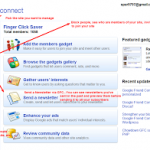
Click the picture to view a larger screen shot
  • You have the ability to send a Newsletter via GFC – I try not to send these often.  You don’t want to create over-kill and lose readers/followers.  There’s an option for you to preview your newsletter before sending it out – click on preview and send it to yourself.  A disclosure is already included in the email for subscribers to unsubscribe should they want to.
  • You have the ability to place a Newsletter gadget on your site – This is specifically for you to be able to have someone sign up for your newsletter.   
  • You can ask visitors when they join your site to subscribe to your newsletter – Simply check the box just above ‘Compose a newsletter’ when you’re under the ‘Newsletter’ tab.  You do not need to send a newsletter out to utilize this feature.
  • You have access to several gadgets via GFC – You’ll find these under the Gadgets tab
  • You can gather your member’s interests – There is a guide under the ‘Interest’ tab you can read to see what it’s all about and give you ideas.
  • You can create a Poll gadget – You’ll find this under the ‘Interests’ tab.
  • You can moderate your followers – You can view everyone who is a member of your site.  You can invite people to join you via GFC.  You can block followers from your site.   
  • You can export your site’s Friend Connect data in JSON and XML as well as CSV format for spreadsheet analysis 
  • There are Plug-ins & API’s ( I won’t even go there on this one…I don’t know enough about API’s)
  • You can create a sign in prompt, a sign out prompt, an un-join prompt and a Join Confirm Message.  For instance, I’ve left the sign in and out prompt as what they already have for a default. When one joins my site though, I have a welcome message.  Likewise, when they unjoin my site, I have a message simply saying I am sorry to see them go and to feel free to come back anytime.
  • View site analytics – See total members and new members over time
As you can see, GFC is a great tool for your site. 

Aug 272011
 
Okay…so InboxDollars is not a quick rich scheme by any means. But…if you are in your email anyway, what does it take to click on one of their paid emails to earn a couple cents for viewing their ads?  You can also earn from taking surveys, trying new products, playing games, shopping online (cash back shopping), and using their toolbar.

I currently have nearly $58 in my account from over the years I have been a member.  Now this could be a lot more should I take advantage of their ‘get paid to try’ offers.  Unfortunately, I don’t have the head to try something for so many days and then go back and cancel it out before the trial period ends.  However….if you do have the time and are an organized person, you could make your account balance go up real fast.

One suggestion for this is to sign up for the offer, then mark the end of the trial period date on your calender, along with the phone number you need to call.  Come that day, give them a call to stop future charges.  You’ve just earned some cash for trying out that product or service with no future obligations! As I type this I am saying to myself…why can’t you get your act together Susan?!  Do you realize this could be money in your pocket…all you need is a calender and a more organized day!

Go make some money and make it a great weekend!

Aug 242011
 
Are you an avid user of the bookmarks/favorites tool on your web browser?  I very much am.  And for me, I tend to bookmark away and end up having duplicate entries or don’t ever make it back to the bookmark in like…forever.  Then when I do, I then find the link is no longer any good.  This is where AM-Deadlink comes in.

It’s all in the bookmarks!

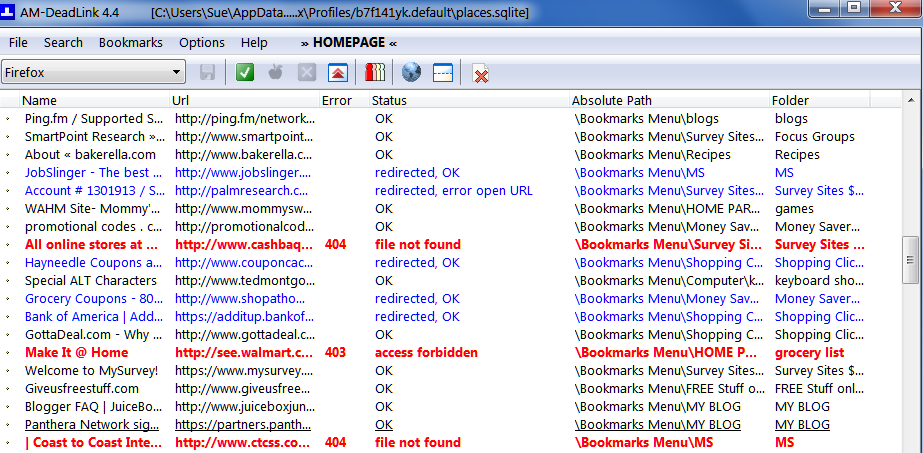
                                                click to enlarge

AM-Deadlink is a free software download on CNet. I’ve installed the program on several computers, over many years, and never had an issue. Once you open the program, it should run automatically. If it doesn’t, choose the browser you want the program to run on (top left) and click on the green check mark. Your screen then will show you what links are good (black and blue) and what ones aren’t (red).

The latest version will detect dead links in Internet Explorer, Opera, Mozilla and Firefox.  In Chrome; however, it detects them but you will need to manually delete the entries.  This is very easy to do when you open up “Bookmark Manager” (click on the wrench on the Chrome browser then to Bookmarks).  Simply copy the entry in AM-Deadlink and then paste in the search box in the organize folder.  All the bookmarks pertaining to that link will show up.  All you need to do is delete them.  
******************************************************
Be sure to check out the 3 fabulous giveaways you may like to enter.  Click on the Giveaway tab and you will be taken to them!  All 3 are cash or cash related…think Christmas! 
Make it a great day!

Aug 242011
 
I am thrilled to bring you this giveaway!  Several Bloggers have come together to bring their followers a $185 giveaway to PayPal.  Yes, that’s right!  One winner will have $185 deposited into their PayPal account.  All you need to do is enter.  Since Rafflecopter is being used for the method of entering – entering is now easier than ever.  How sweet considering we are heading into the holiday season!  Best of luck to all those who enter!
RafflecopterSettings = {
raffleID: ‘YzQyNGExMDJlNmM2YmQ2YzhlZTQ3OThmYzY2NzM1OjQ=’
};

<a href=”http://rafl.es/enable-js”>You need javascript enabled to see this giveaway</a>.

Aug 212011
 

This month I have teamed up with 20 other blogs to bring you a fantastic giveaway! We are giving away an Amazon Gift Card valued at $210!!!
In order to win this giveaway you need to “Like” all 21 blogs that are participating in this giveaway. You can earn extra entries by following each blog with Twitter and Google Friend Connect.
Please fill our the Rafflecopter Form Below to enter this giveaway!

RafflecopterSettings = {
raffleID: ‘Y2RmOTg3N2U4NTU2ZDViN2FkZGU5MmZjMzcyMzgzOjIx’
};

Aug 212011
 
This post brought to you by Straight Talk. All opinions are 100% mine.
If you haven’t heard of Straight Talk – you should take the time to read this.  I personally can vouch for this cell phone service as I have an LNA and her husband who use this service.  A support person who worked with my son at Easter Seals also uses this service.  I have heard nothing but good from these people.  They don’t have dropped calls, they get service wherever they are and their phone choice has served them well.

So what is Straight Talk?  Straight Talk is a cell phone service where there are no contracts to sign, no surprise bills, and no credit checks.  There’s no activation fee, reactivation fee, or termination fees.  Straight Talk uses trusted phone manufacturers like Samsung, LG, Motorola, Kyocera and Nokia.  To hear more on their phones:                

[youtube http://www.youtube.com/watch?v=n_ecrdY2MLA]

Here’s the deal on their monthly plans:
The “All You Need Plan” includes:  
  • 1000 minutes
  • 1000 texts
  • 30 MB of web data   
  • 411 calls at no extra charge
The “Unlimited Monthly Plan” – $45 includes:
  • Texts
  • calls
  • Picture Messaging 
  • Web        
  • 411 calls at no extra charge                                       
They offer an International Long Distance Service as well.  This is a flexible prepaid calling service that enables you to make international calls from your home, cell or office phone at low rates.
Straight Talk offers reconditioned phones starting at $10 – perfect for the young users.  These phones have a camera, mp3 player, mobile web access and blue-tooth capability.  When it comes to paying top dollar for a cell phone for a kiddo, mom knows best they certainly don’t need an expensive phone. They’ll either end up losing it,  breaking the LCD screen, or it will get stolen.  In addition, they offer the popular smart phones, touch screen phones and app capable phones with features like voice navigation, camera, video recorder, music player, Bluetooth and instant messaging.  
                                                    
Considering the price of this service and it having everything you need, can you see yourself saving lots of money compared to what you currently pay now for your cell phone service?  You’ll have a peace of mind knowing when your child goes to call a friend knowing they won’t go over their minutes. I  know when our contract ends, this is where we are headed.  I can use their website to pay monthly or even have the fee taken out of my account monthly.

GDPR Cookie Consent with Real Cookie Banner